FedEx Freight Bill of Lading and other shipping forms

On this page
What is a Bill of Lading and what are my options?
#what-is-a-bill-of-lading-and-what-are-my-options-for-filling-one-out
How to fill out a BOL by hand
Space and Pace Bill of Lading
Other LTL freight shipping forms
Helpful resources
What is a Bill of Lading, and what are my options for filling one out?
A Bill of Lading (BOL) is a form that documents the details of your shipment, including contents, origin, and destination.
- It serves as a legal contract of carriage with terms and conditions of FedEx Freight® shipments.1
- It’s used to calculate charges.
- It includes the purchase order number, other reference numbers, and freight classification.
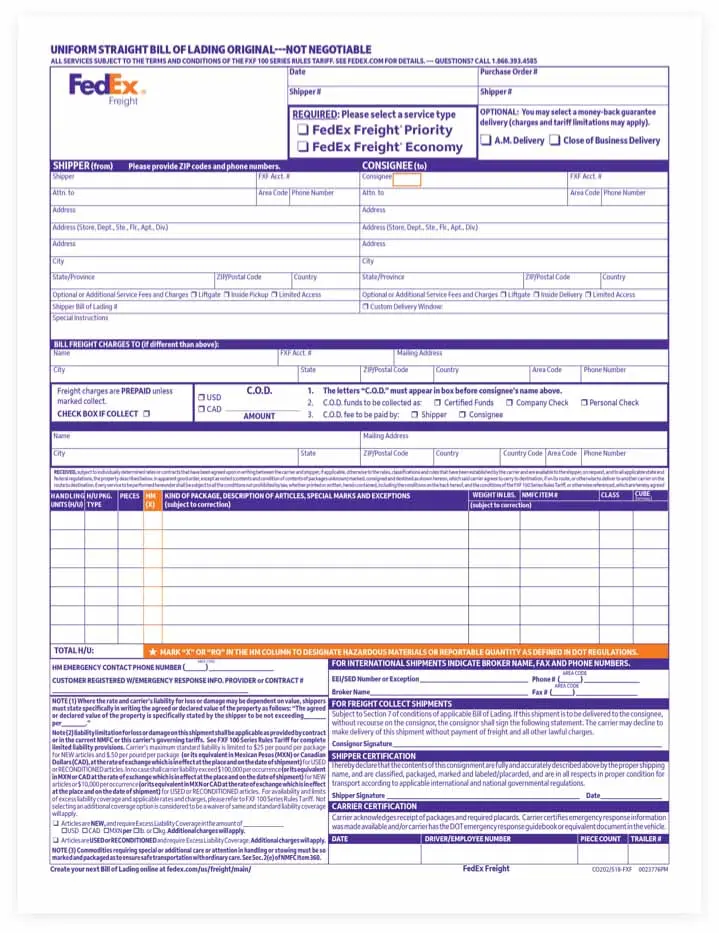
A BOL is required for all domestic and international LTL shipments, including those you send through freight forwarders. You can choose to generate a BOL online or fill out a paper version manually.
Creating a Bill of Lading online
This option is easier than filling out a BOL by hand. It can also help you reduce invoice errors and delivery issues that paper forms can create. Here are some other benefits:
- Your pickup process will be faster, since you no longer have to provide a paper BOL to a driver.*
- You can instantly track your shipment. (Paper BOL tracking doesn’t start until the shipment is manually entered into the system.)
- You’ll have a digital trail that’s not available with paper forms.
*You can use an online Bill of Lading for any shipment type in any scenario. But note that you must provide a paper copy of your BOL to your FedEx Freight driver on pickup if you’re sending international, hazmat, or shipper load and count shipments, even if you created the shipment online.

Filling out a Bill of Lading by hand
If you choose this method, you’ll need to give your paper BOL to the FedEx driver who picks up your LTL freight shipment. Your driver will give it to your recipient upon delivery. A manually completed paper BOL acts as your receipt and shipping label.
If you want to complete a paper Bill of Lading, you can download a blank form here, complete the editable fields, and print it. Or you can print it and fill it out by hand. You can also use a BOL from another non-FedEx Freight source. If you need help filling out the FedEx Freight BOL by hand, please see the steps below.

How to fill out a Bill of Lading by hand
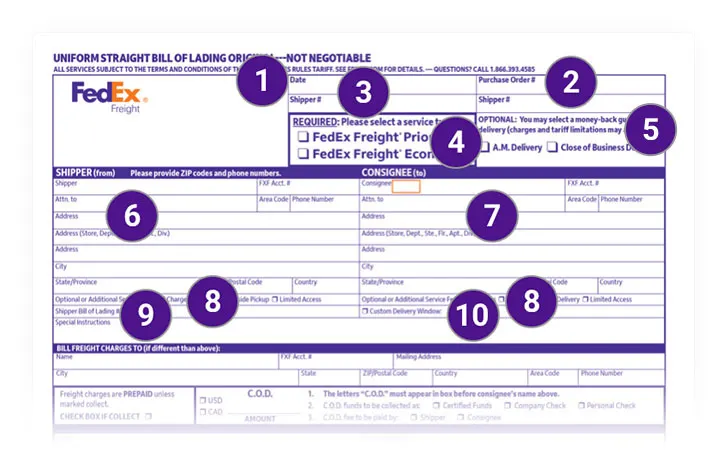
1. Date. Enter the month, day, and year the LTL freight was shipped or picked up by us.
2. Purchase order #. Enter the purchase order number you received from the consignee/recipient (the person receiving the shipment) or buyer.
3. Shipper #. Enter the reference number provided by the shipper.
4. Required (select service type). Check the shipping service for your shipment. Use FedEx Freight® Priority when speed is critical; use FedEx Freight® Economy when you can trade time for savings.
5. Optional (guaranteed shipping options). You can select a money-back guarantee for your delivery. Note that charges and tariff limitations may apply.
Choose:
- A.M. Delivery for delivery by 10:30 a.m. on the standard due date, with a money-back guarantee.1
- Close of Business Delivery for delivery by 5 p.m. on the standard due date, with a money-back guarantee.1
6. Shipper section. Enter your name, FedEx Freight account number, attention designation, phone number, and address.
7. Consignee section. Enter the consignee/recipient’s name, FedEx Freight account number, attention designation, phone number, and address. Enter C.O.D. in the orange box for C.O.D. shipments.
8. Optional or additional service fees and charges.1 Select all that apply for both the Shipper and Consignee sections. It’s important that you verify your consignee selection with the consignee. Discrepancies can cause delivery delays and/or additional charges. You may choose:
- Liftgate: A FedEx Freight trailer will require a liftgate to load or unload the shipment.
- Inside Delivery: Your shipment will require a pickup or delivery beyond a point directly accessible to the trailer.
- Limited Access: Pickup or delivery will need to be made at a limited access location (e.g., school, construction site, military base).
9. Shipper’s Bill of Lading #. Enter the Bill of Lading number supplied by the shipper to reference shipment information.
10. Custom delivery window. Fill out only if your delivery request is something other than standard transit. For no additional fee, you can select a delivery before, on, or after a date, or between two dates, as long as it’s after the standard delivery date.
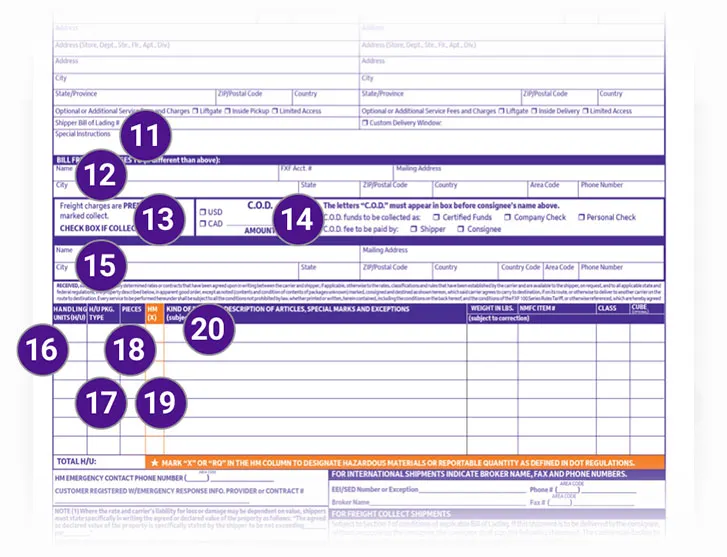
11. Special instructions. Include any special instructions for the shipment.
12. Bill freight charges to. To bill a third party, list the representatives responsible for paying LTL freight charges, if different from the shipper or consignee. Include their contact information and FedEx Freight account number if known.
13. LTL freight charges are prepaid unless marked collect. Check the box if payment should be collected on delivery.
14. C.O.D. section. Enter the C.O.D. amount and select the currency type. Check the box for how the funds are to be collected and who pays the C.O.D. fee.
15. Remit C.O.D. to. Enter the address where the C.O.D. payment should be sent if different from the address above.
16. Handling Units (H/U). Enter the number of units to be loaded (e.g., 2 pallets).
17. H/U pkg. type. Enter the type of shipping unit (e.g., pallet, crate, drum).
18. Pieces. Enter the total number of pieces (e.g., boxes or items on the pallet) for the shipment.
19. HM(X). The Hazardous Materials column should contain an “X” or “RQ” if the shipment contains hazardous materials. “RQ” stands for a Reportable Quantity as defined by U.S. Department of Transportation (DOT) regulations. Please include an emergency contact phone number. (See step 26.)
20. Kind of package, description of articles, special marks, and exceptions. Add all that apply: type of shipping unit (e.g., carton, skid, drum); LTL freight description (complete description of the contents); special markings (precautionary markings such as Keep Upright, Freezable, Glass, Do Not Double Stack, etc.); and special instructions (Call Before Delivery, Liftgate Required, etc.).
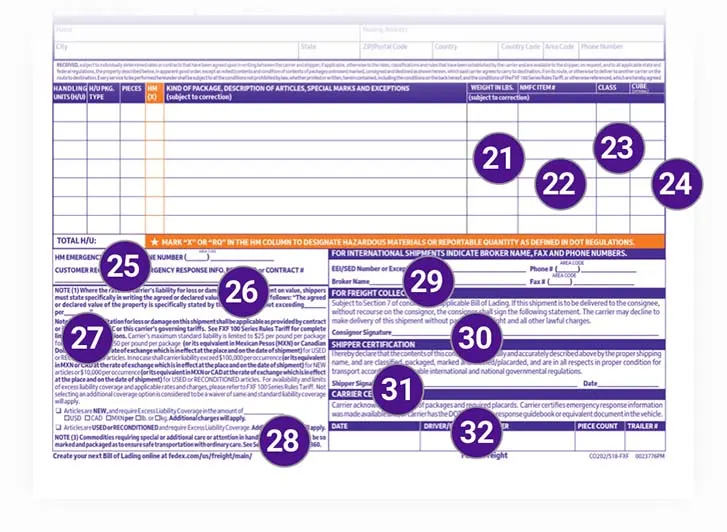
21. Weight in lbs. Enter the total combined weight of each commodity, including the crate or pallet.
22. NMFC item #. Enter the National Motor Freight Classification item number for the commodity type. For help in determining the NMFC item number, contact FedEx Freight Customer Service at 1.866.FXF.4LTL.
23. Class. Enter the number assigned by NMFC for proper rating. For help in determining NMFC class designation, contact FedEx Freight Customer Service at 1.866.FXF.4LTL.
24. Cube. Enter cubic feet of the shipment: (L x W x H) in inches, divided by 1,728.
25. Total H/U. Enter the total number of handling units (e.g., pallets or drums) in the shipment.
26. HM emergency contact section. When shipping hazardous materials, provide the hazardous materials emergency contact phone number. Also provide the name of the hazardous materials provider or the contract number.
27. Note (1). Enter the declared value of the shipment. When the rate is dependent on the value, you’re required to specifically state the agreed-upon or declared value of the shipment.
28. Note (2). If excess liability coverage (ELC) is requested, indicate the new or used condition of the articles and the amount of coverage being requested
(including the currency and whether it is per lb. or kg). Subject to maximum ELC limits; additional charges may apply.
29. For international shipments indicate broker name, fax, and phone numbers. Add the EEI/SED Number or Exception. The Electronic Export Information (EEI), formerly Shipper’s Export Declaration (SED), is used by the U.S. Census Bureau for compiling official U.S. export statistics and to help regulate the export of goods to other countries. Also add the customs broker contact name, phone number, and fax number.
30. For LTL freight collect shipments. Execute this nonrecourse clause when you don’t want to be responsible for the inability of the carrier to collect LTL freight charges from the consignee at the destination.
31. Shipper certification. If the shipment contains hazardous materials, you must sign and date this field. It indicates that materials are packaged, labeled, classified, and marked according to U.S. Department of Transportation (DOT) regulations.
32. Carrier certification. If the shipment contains hazardous materials, the agent for the carrier (driver) must sign the field. This declares that the shipment is in accordance with DOT regulations. The section also includes the date, driver’s employee number, number of pieces in the shipment, and shipping trailer number for hazardous material shipments.
Space and Pace Bill of Lading
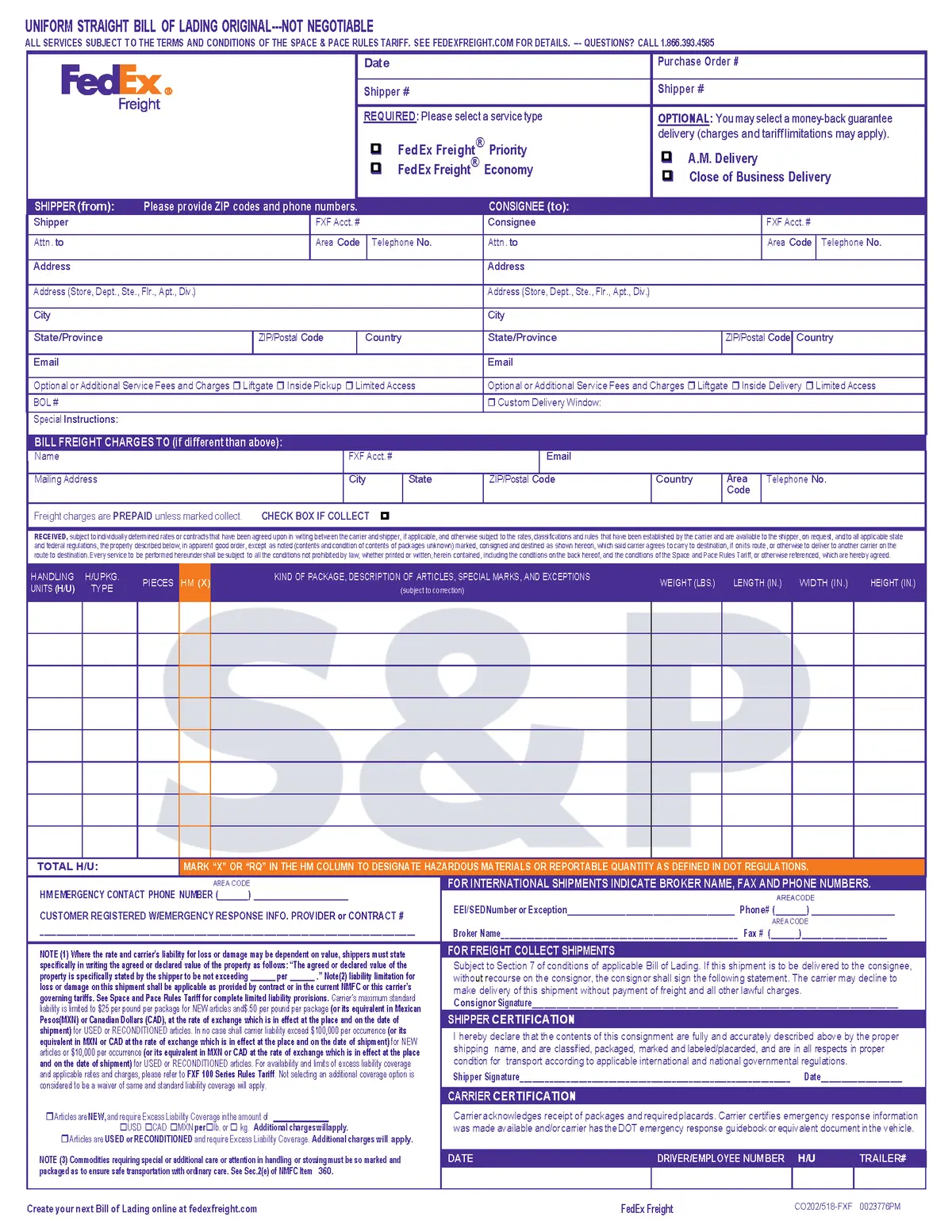
Space and Pace is a pricing program that offers U.S. Domestic and U.S./Canada cross-border customers the ability to quote and pay for their shipments based on actual dimensions, rather than using the National Motor Freight Classification(NMFC) pricing system. To learn more about Space and Pace, click here.
For customers already signed up for the Space and Pace pricing program, click the link below to download the Space and Pace BOL.
Other LTL freight shipping forms
U.S. to Puerto Rico
- Uniform Straight Bill of Lading
- Commercial Invoice
File your Electronic Export Information (EEI) when applicable by using the Automated Commercial Environment (ACE) Portal.
Canada to Canada
Canada to Puerto Rico
Puerto Rico to U.S. and Canada.
Credit application forms
United States Postal Service documents for drop shipments
Helpful resources for shipping LTL freight