Schedule a FedEx Freight pickup

GET STARTED

Key details for scheduling LTL pickups

false
Schedule an online pickup for your LTL (less-than-truckload) shipment as soon as the same business day, or up to 10 business days in advance. A FedEx Freight account is not required to schedule your pickup, but it is recommended. If you don’t have a FedEx Freight account, request one today.
default
You can ship within Canada and the U.S. and to Mexico.
default
General cutoff time for automation-generated pickup requests is 3 p.m. Need a later pickup time? Call FedEx Freight Customer Support at 1.866.393.4685 or your local service center.
default
We can pick up your freight at a local dock if you prefer.
default

You can sign up to receive notifications. You’ll know when:

  • Pickup is scheduled
  • Driver is assigned
  • Driver is en route
  • Driver has arrived
  • Driver has departed

Creating a shipment online (online Bill of Lading)

Once you create your shipment, you have the option to schedule a pickup.

  • If you want to schedule a pickup later, follow either the "pickup online" or "by phone" process below when you're ready.
  • If you choose to act now, you’ll be routed to the schedule-a-pickup process below. Note that creating an online Bill of Lading doesn’t automatically schedule a pickup.

img-icon-large
button-primary
horizontalLeft
true
transparent

Creating a shipment offline (manual/handwritten Bill of Lading)

A FedEx Freight account is not required to schedule your pickup, but it is recommended.

  • If you have a FedEx Freight account, include your account number on the handwritten Bill of Lading.
  • When you’re ready, follow either the "pickup online" or "by phone" process below.
img-icon-large
button-primary
horizontalLeft
true
transparent

Schedule your LTL freight pickup by phone

You can call FedEx Freight Customer Support at 1.866.393.4685. You can also contact your local service center to schedule a pickup. If you have a FedEx Freight account, please have your account number handy to share with customer support.

img-icon-large
button-primary
horizontalLeft
true
transparent

How to schedule your LTL freight pickup online

false
You can request a pickup when you create your online Bill of Lading, or when creating an offline shipment with a handwritten Bill of Lading. You may request pickup as soon as the same business day, or up to 10 business days in advance. A FedEx Freight account is not required to schedule your pickup, but it is recommended.
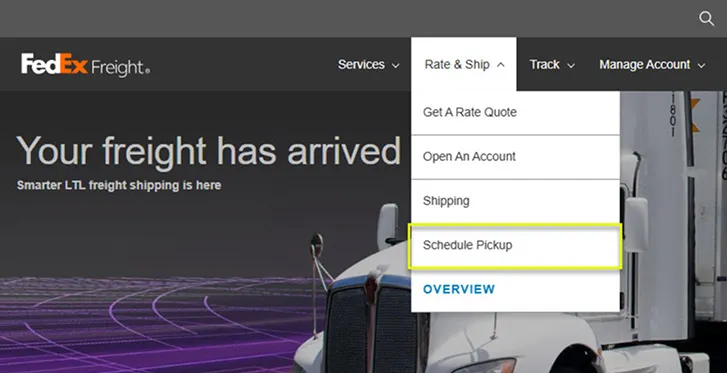
Under the Rate & Ship menu, click Schedule Pickup.
img-icon-small
button-primary
horizontalLeft
false
transparent
img-full-width
button-primary
verticalLeft
false
transparent
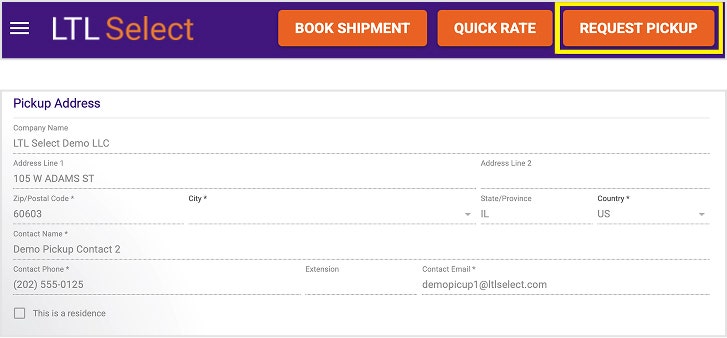
You'll be redirected to LTL Select tool where you will enter your contact information and pickup address details.
img-full-width
button-primary
verticalLeft
false
transparent
img-full-width
button-primary
verticalLeft
false
transparent
false

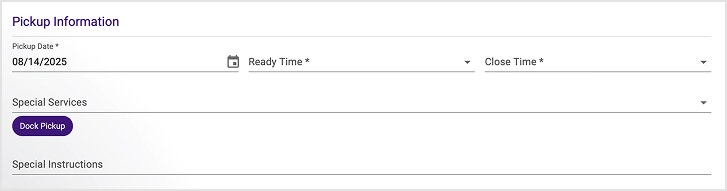
Enter the pickup information.

  • Pickup Date

  • Ready Time/Close Time: Provide the earliest/latest time the driver can pick up your shipment.

    • Your Ready Time can’t be later than 3 p.m. local time when you’re booking online. If you’re requesting a same-day pickup, you may be able to get service after 3 p.m. Call FedEx Freight Customer Support at 1.866.393.4685 or your local service center to confirm whether a freight driver is in your area.
    • We require a 90-minute window between Ready Time and Close Time.
  • Special Services: Specify any requirements such as liftgate pickup.

  • Special Instructions: Add any pickup remarks for the driver. For example, “Use loading dock B.”

img-icon-small
button-primary
horizontalLeft
false
transparent
img-full-width
button-primary
verticalLeft
false
transparent
false
Add an email address to receive confirmation notifications.
img-icon-small
button-primary
horizontalLeft
false
transparent
img-full-width
button-primary
verticalLeft
false
transparent
false

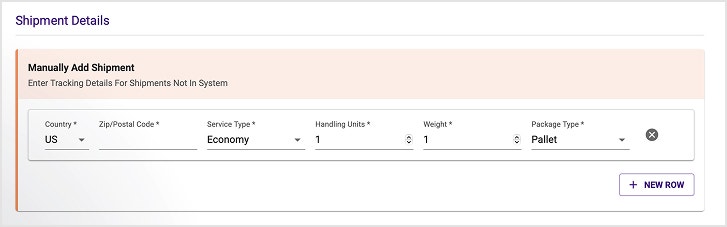
Enter the necessary details for your shipment.

  • Country and Destination ZIP Code
  • Service Type
  • Total Weight
  • Number of Handling Units
  • Package Type
img-icon-small
button-primary
horizontalLeft
false
transparent
img-full-width
button-primary
verticalLeft
false
transparent
false
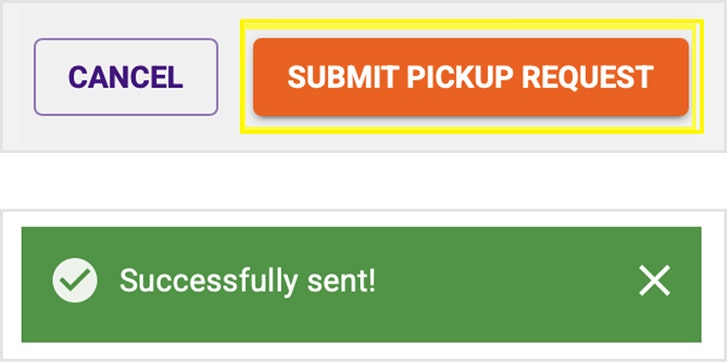
Click Submit Pickup Request. You’ll see a confirmation message.
img-icon-small
button-primary
horizontalLeft
false
transparent
img-full-width
button-primary
verticalLeft
false
transparent
false
button-secondary
left
SCHEDULE YOUR PICKUP
https://fedExfreight.ltlselect.com/pickup
SCHEDULE YOUR PICKUP

Schedule recurring pickups

false
Are you a frequent shipper? With one call, you can get pickups every business day. Contact FedEx Freight Customer Support at 1.866.393.4685.

More resources for moving LTL freight with ease

Make sure your freight is packed correctly

How you prep your shipment makes all the difference. Proper packing helps support safe handling.

img-icon-large
GET PACKING GUIDANCE
button-secondary
verticalCenter
false
transparent
Check out the FedEx Freight holiday schedule

See service hours for holidays like Labour Day and Christmas so you can plan your shipments.
img-icon-large
READ THE SCHEDULE
button-secondary
verticalCenter
false
transparent
Map out your freight
deliveries

Use color-coded maps to quickly see typical freight transit times based on ZIP codes.
img-icon-large
VIEW TRANSIT MAPS
button-secondary
verticalCenter
false
transparent
If you have special freight needs, such as pickup from an area with limited access, we can help. Call FedEx Freight Customer Support at 1.866.393.4685.
img-icon-medium
button-primary
horizontalLeft
false
transparent

FAQs

How much do freight pickups cost?
true
They are free Monday to Friday. There may be additional surcharges for services such as limited access or inside pickup.

If you’ve scheduled a pickup but don’t have a shipment when the FedEx Freight driver arrives, you’ll be charged a fee. To avoid this fee, you need to cancel the pickup before it’s assigned to a driver. You can cancel a freight pickup online, unless it’s too close to the cutoff time. If so, you’ll see a message to call the service center. You can also cancel by calling FedEx Freight Customer Support at 1.866.393.4685 or your local service center.
Can I request a pickup online for Saturday or Sunday?
true
No, but you can contact your local service center to arrange one.
Do I need to be present for a freight pickup?
true
You or someone you authorize needs to be present to sign the Bill of Lading.
How late can I schedule an LTL pickup?
true
It depends on factors such as where you’re shipping. Contact your local service center for details.
How do I cancel a pickup?
true
You can cancel a freight pickup online, unless it’s too close to the cutoff time. If so, you’ll see a message to call the service center. You can also cancel by calling FedEx Freight Customer Support at 1.866.393.4685 or your local service center.
What is a liftgate, and why do I need it?
true
A liftgate is device on a truck that can raise and lower items from ground level to the level of a trailer. To ship freight, you'll need to know if the pickup and drop off locations have shipping docks. No dock means you'll need to request a liftgate. Not having a liftgate when you need one delays pickups and deliveries and can cause extra fees.